---
title: Create a whitelabel 'Connect to WhatsApp' button
description: Guide for software vendors looking to enable their customers to use their own WhatsApp senders
---
[Skip to content](https://support.messente.com/create-a-custom-connect-to-whatsapp-button#main-content)
English
Show submenu for translations
![Logo\_mark\_150x150-1.png\]](https://support.messente.com/hs-fs/hubfs/Logo_mark_150x150-1.png?height=40&name=Logo_mark_150x150-1.png)
Open main navigation
Close main navigation
- English
Show submenu for translations
- Go to Messente
Go to Messente
How can we help you?
- There are no suggestions because the search field is empty.
1. [| Knowledge Base](https://support.messente.com/?hsLang=en)
2. [WhatsApp Business Messages](https://support.messente.com/whatsapp-business-messages?hsLang=en)
3. [Scaling up](https://support.messente.com/whatsapp-business-messages?hsLang=en#scaling-up)
# Create a whitelabel 'Connect to WhatsApp' button
## Guide for software vendors looking to enable their customers to use their own WhatsApp senders
If you are a software vendor whose customers want to send WhatsApp messages under their own brand, they will need to link their WhatsApp account to your Messente account. Once this connection is established, you can route their messaging traffic to the new Sender created through this process.
You can create a button in your product to do this using this link format:
https://wa.messente.com/custom?account\_uuid=**\[YOUR\_UUID\]**&callback\_url=**\[CALLBACK\_URL\]**&title=**\[TITLE\]**&description=**\[DESCRIPTION\]**
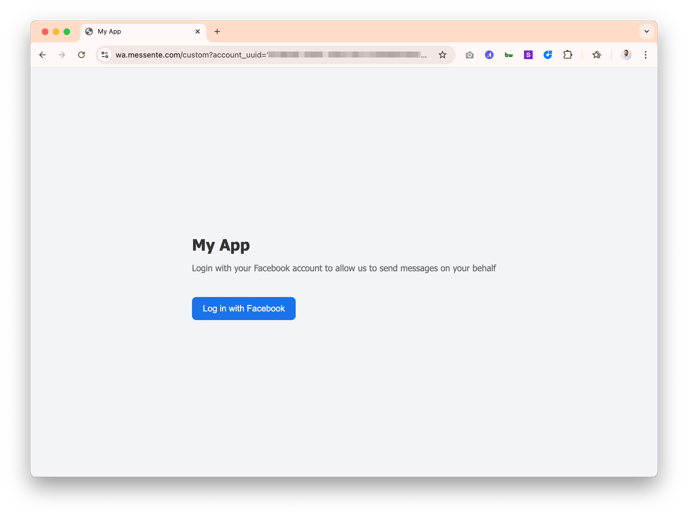
*Example page. Customise the title and description in the URL*
### Guide to paramaters
| **YOUR\_UUID** | Long string. Request from support |
| --- | --- |
| **CALLBACK\_URL** | Notifications of sign-ups will be sent to this URL |
| **TITLE** | Main header text, 'My App' on example above |
| **DESCRIPTION** | Longer text below the title |
The 'Login with Facebook' button will bring up the same Meta form that you would see if you clicked `Connect` under WhatsApp on the [Senders page in the Messente Dashboard.](https://dashboard.messente.com/sender-names)
You can see this experience being demoed here:
### Next steps
Before your customer can begin sending WhatsApp messages using their new WhatsApp Business Account Sender, they must set up message templates. There are several methods available for doing this, including:
1. Use the new [Messente Template Management API](https://messente.com/documentation/omnichannel-api/whatsapp-template-api)to automatically push standardised templates into their account as they sign up
2. Create a custom template builder in your product using the new [Messente Template Management API](https://messente.com/documentation/omnichannel-api/whatsapp-template-api)
3. Direct the customer to the [Template builder](https://support.messente.com/whatsapp-templates?hsLang=en) within the Meta portal
Demo of the Template Management API:
- [Getting Started](https://support.messente.com/getting-started?hsLang=en#main-content)
- [Setting up your account](https://support.messente.com/getting-started?hsLang=en#setting-up-your-account)
- [Sending from Dashboard](https://support.messente.com/getting-started?hsLang=en#sending-from-dashboard)
- [Phonebook](https://support.messente.com/getting-started?hsLang=en#phonebook)
- [Security](https://support.messente.com/getting-started?hsLang=en#security)
- [Dashboard's developers section](https://support.messente.com/getting-started?hsLang=en#dashboards-developers-section)
- [Country Specific Features and Restrictions](https://support.messente.com/country-specific-features-and-restrictions?hsLang=en)
- [Analytics & Troubleshooting](https://support.messente.com/analytics-troubleshooting?hsLang=en#main-content)
- [Delivery reports](https://support.messente.com/analytics-troubleshooting?hsLang=en#delivery-reports)
- [History & Statistics](https://support.messente.com/analytics-troubleshooting?hsLang=en#history-statistics)
- [Viber Business Messages service](https://support.messente.com/viber-business-messages-service?hsLang=en)
- [WhatsApp Business Messages](https://support.messente.com/whatsapp-business-messages?hsLang=en#main-content)
- [Getting started](https://support.messente.com/whatsapp-business-messages?hsLang=en#getting-started)
- [Scaling up](https://support.messente.com/whatsapp-business-messages?hsLang=en#scaling-up)
- [Verigator](https://support.messente.com/verigator?hsLang=en)
- [RCS for business](https://support.messente.com/rcs-for-business?hsLang=en#main-content)
- [RCS for Business](https://support.messente.com/rcs-for-business?hsLang=en#rcs-for-business)
- [Getting started](https://support.messente.com/rcs-for-business?hsLang=en#getting-started)
[](https://messente.com)
Did not find an answer to your question? Contact support@messente.com
Copyright © 2026, Messente Communications OÜ